
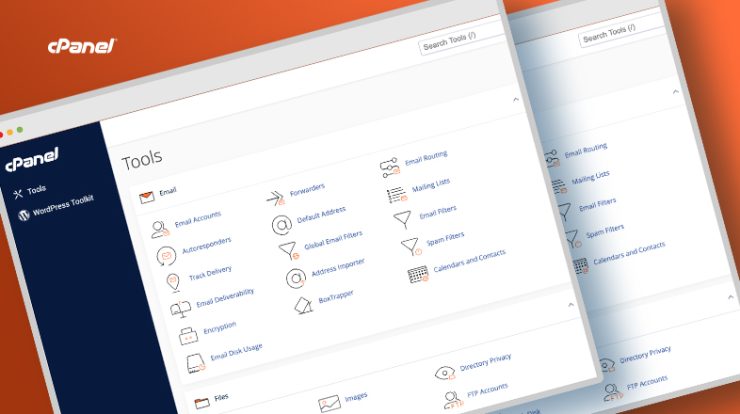
If you have ever purchased web hosting, chances are you have encountered cPanel. For more than two decades, cPanel has been the gold standard for managing websites, email accounts, databases, and server settings through a simple graphical interface. Instead of memorizing Linux commands or editing configuration files manually, cPanel allows anyone—from beginners to professional system administrators—to control their hosting environment with a few clicks.
Millions of website owners rely on cPanel every day. Bloggers use it to install WordPress, businesses create professional email accounts, developers manage databases, and hosting providers use it to automate customer management. Its widespread adoption has made cPanel one of the most recognized names in web hosting.
In this article, we will explore what cPanel is, its major features, the advantages it offers, and why it remains one of the most important technologies in the hosting industry. We will also look at current market share statistics and explain how many people use cPanel across the internet.
What Is cPanel?
cPanel is a Linux-based web hosting control panel that provides a graphical interface and automation tools to simplify website and server management.
Before control panels existed, administrators managed servers entirely from the command line. Tasks such as creating email accounts, adding domains, configuring databases, and installing SSL certificates required technical expertise. cPanel changed that by providing a browser-based dashboard where users can perform these tasks with point-and-click tools.
cPanel is typically paired with Web Host Manager (WHM). WHM is designed for server administrators and hosting providers, while cPanel is designed for end users.
Together, WHM and cPanel provide a complete hosting platform.
The History of cPanel
cPanel was created in 1996 and has become one of the most established products in web hosting. Over the years it has evolved from a simple administration utility into a comprehensive platform for:
- Shared hosting
- Reseller hosting
- VPS hosting
- Dedicated servers
- Managed hosting services
Today cPanel is part of the WebPros family, which also includes Plesk and other hosting technologies.
How Popular Is cPanel?
cPanel remains one of the most widely used hosting control panels in the world.
According to WebPros’ 2026 Web Hosting Trends Report, 64% of surveyed hosting providers offer cPanel/WHM on their servers, making it the most commonly offered commercial hosting control panel. (WebPros)
Other market indicators show cPanel powering a massive installed base:
- Similarweb identified more than 1.57 million websites using cPanel.
- iDataLabs estimates over 1.1 million companies use cPanel.
- TechnologyChecker tracks more than 168,000 directly detectable company deployments.
- W3Techs detects cPanel on approximately 0.2% of all websites and 2.1% of websites where the control panel can be identified publicly. (TechnologyChecker.io)
Because many hosting providers hide their control panel signatures, public detection significantly understates actual usage. Industry experts generally agree that cPanel is used by millions of businesses and website owners worldwide.
Why cPanel Became the Industry Standard
cPanel became dominant because it solved a difficult problem: making Linux server administration accessible to non-technical users.
Its success is built on several strengths:
- Easy-to-use graphical interface
- Powerful automation
- Broad hosting provider support
- Extensive documentation
- Strong third-party ecosystem
- Reliable migration tools
- Long-term stability
For many users, learning cPanel once means being able to manage websites at thousands of hosting companies.
The Main cPanel Interface
The cPanel dashboard organizes tools into sections such as:
- Files
- Databases
- Domains
- Security
- Software
- Metrics
- Advanced
- Preferences
This organization makes it easy to find the exact tool needed.
File Management Features
File Manager
The File Manager allows you to:
- Upload and download files
- Edit code directly
- Create folders
- Compress and extract archives
- Set file permissions
This is one of the most frequently used cPanel tools because it enables quick changes without FTP software.
FTP Account Management
cPanel lets you create FTP accounts for developers and clients, with custom directory access and password controls.
Disk Usage Monitoring
You can see which folders consume the most storage and identify large backups, logs, or email folders.
Domain Management Features
Addon Domains
Host multiple websites under one hosting account.
Subdomains
Create addresses such as blog.example.com or store.example.com.
Aliases and Redirects
Point multiple domains to the same site or forward visitors to another URL.
DNS Zone Editor
Manage A, CNAME, MX, TXT, and other DNS records.
Email Management Features
cPanel includes enterprise-style email tools.
Email Accounts
Create addresses such as info@yourdomain.com and sales@yourdomain.com.
Webmail
Access mail using integrated applications such as Roundcube.
Forwarders
Automatically redirect messages to other addresses.
Autoresponders
Send vacation notices or confirmation messages.
Spam Filters
Block unwanted mail using configurable filtering.
Mailing Lists
Manage newsletter and discussion list communications.
Database Management
MySQL and MariaDB Databases
Create and manage databases used by WordPress and custom applications.
phpMyAdmin
Browse tables, import/export data, and run SQL queries.
Remote Database Access
Authorize external applications to connect securely.
One-Click Application Installation
Many hosts integrate Softaculous with cPanel.
This allows one-click installation of:
- WordPress
- Joomla
- Drupal
- Magento
- phpBB
WordPress can be installed in under a minute.
Security Features
SSL/TLS Management
Install and renew SSL certificates, often using free Let’s Encrypt certificates.
IP Blocker
Restrict unwanted visitors.
Hotlink Protection
Prevent others from embedding your images and consuming bandwidth.
Password-Protected Directories
Secure private content areas.
Two-Factor Authentication
Require a secondary verification code during login.
ModSecurity
Enable web application firewall rules.
Backup Features
Backup Wizard
Download or restore full and partial backups.
Scheduled Backups
Many hosts automate daily or weekly backups.
Account Restore
Recover files, databases, and email after mistakes or attacks.
Website Performance Tools
Resource Usage
Monitor CPU, memory, and process limits.
Optimize Website
Enable compression for faster delivery.
PHP Selector
Choose among supported PHP versions.
MultiPHP Manager
Assign different PHP versions to different domains.
Caching Integrations
Some providers integrate acceleration technologies like LiteSpeed Cache.
Cron Jobs
Automate repetitive tasks such as:
- Database backups
- Scheduled scripts
- Email reports
- Data synchronization
Metrics and Analytics
cPanel provides operational visibility through:
- Bandwidth statistics
- Error logs
- Access logs
- Visitor data
- Awstats and Webalizer (when enabled)
Git Integration
Modern cPanel versions support Git deployment workflows, allowing developers to push code from repositories.
Terminal Access
Many hosts provide browser-based terminal access for advanced command-line administration.
WordPress Toolkit
Some hosts include a toolkit for staging, cloning, and securing WordPress sites.
MultiPHP INI Editor
Modify PHP directives such as memory_limit, upload_max_filesize, and max_execution_time.
Advantages of cPanel
Easy for Beginners
No Linux expertise is required to manage a website.
Saves Time
Common tasks are completed in seconds.
Universally Recognized
Users can switch hosts without relearning the interface.
Reliable and Mature
cPanel has decades of development and operational experience.
Powerful Automation
Hosting companies can provision accounts automatically.
Excellent Documentation
cPanel Documentation provides detailed tutorials.
Broad Compatibility
Supports Apache, NGINX integrations, PHP, MySQL/MariaDB, and common email services.
Strong Security
Frequent updates and integrated protections help reduce risk.
Scalable
Suitable for single websites and large reseller environments.
Who Uses cPanel?
cPanel is used by:
- Bloggers
- Small businesses
- Web designers
- Developers
- Agencies
- Hosting resellers
- Universities
- Enterprises
Organizations of all sizes benefit from its standardized management tools.
cPanel for Reseller Hosting
With WHM, resellers can:
- Create customer accounts
- Set quotas and packages
- Brand the interface
- Suspend and restore accounts
- Monitor server usage
This allows entrepreneurs to launch hosting businesses without developing their own control panel.
cPanel vs. Plesk
Plesk is a major alternative.
cPanel advantages:
- More common in Linux shared hosting
- Extremely familiar to customers
- Extensive ecosystem
Plesk advantages:
- Supports both Linux and Windows
- Strong developer tooling
Both are industry leaders, but cPanel remains the panel most users recognize.
cPanel vs. DirectAdmin
DirectAdmin is known for lower licensing costs.
cPanel generally offers:
- Larger user base
- More tutorials
- Greater third-party support
Why Hosting Providers Love cPanel
Hosting companies choose cPanel because it:
- Reduces support requests
- Automates account provisioning
- Simplifies migrations
- Provides a familiar experience
- Integrates with billing systems such as WHMCS
Security and Ongoing Updates
cPanel receives regular updates to improve features and address vulnerabilities. Administrators should keep systems patched promptly to maintain security. (TechRadar)
Learning cPanel
Most users can learn the basics in a few hours:
- Upload files
- Install WordPress
- Create email accounts
- Manage databases
- Secure sites with SSL
Because cPanel is so common, these skills remain valuable throughout a web professional’s career.
The Future of cPanel
Although some hosts offer proprietary dashboards and alternatives such as Plesk, DirectAdmin, and open-source panels, cPanel continues to be a cornerstone of the hosting industry. Community discussions consistently describe it as powerful, stable, and familiar despite increased licensing costs. (Reddit)
Its long history, deep feature set, and enormous installed base suggest it will remain highly relevant for years to come.
Final Thoughts
cPanel is one of the most influential technologies in web hosting. It transformed server administration from a command-line-only discipline into a user-friendly experience accessible to virtually anyone.
Whether you are launching your first blog, managing customer websites, or running a hosting company, cPanel offers the tools needed to handle domains, files, email, databases, security, and backups efficiently.
With millions of websites and companies depending on it and 64% of hosting providers continuing to offer cPanel/WHM, it remains the most recognized and widely adopted commercial control panel in the hosting world. (WebPros)
If you want a hosting environment that is powerful, proven, and easy to use, cPanel remains one of the best choices available.

With 23+ years in the Web Hosting Industry, Brian has had the opportunity to design websites for some of the largest companies in the industry. Brian currently holds the position as Co-Founder and Creative Director at WebHosting,coop Internet Cooperative
1 Comment